
Account - Page v2
Displays the WooCommerce My Account page as editable endpoint states with shared account navigation.
Where this element works
Section titled “Where this element works”My Account page.
Key settings
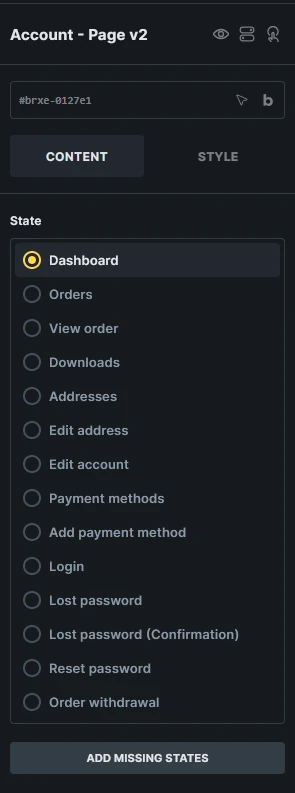
Section titled “Key settings”- State (radio) - Switches the builder preview between My Account endpoint states.
- Direction (direction)
- Gap (number)
- Disable navigation (checkbox)
- Navigation style controls
- Content style controls
States
Section titled “States”- Dashboard
- Orders
- View order
- Downloads
- Addresses
- Edit address
- Edit account
- Payment methods
- Add payment method
- Login
- Lost password
- Lost password (Confirmation)
- Reset password
- Order withdrawal (requires WooCommerce 11.1 or later with Order Withdrawal enabled)
Generated structures
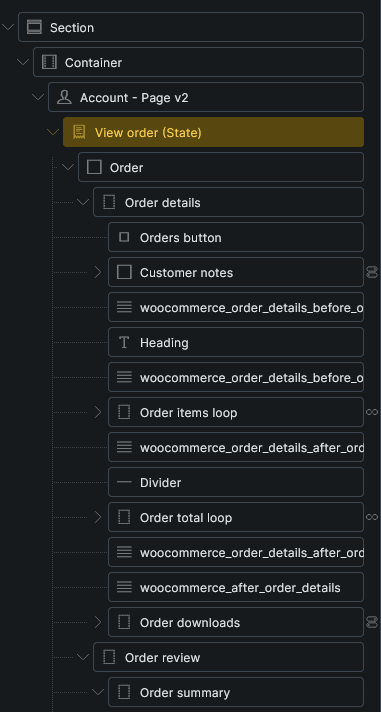
Section titled “Generated structures”Each state can generate a complete starter block for that endpoint from Insert a structure.
Generated structures are appended to the current state content and do not overwrite existing content.
Add missing states
Section titled “Add missing states”If an expected state element is missing, select Account - Page v2 and click Add missing states. Bricks checks all currently available account states and appends any missing state elements without replacing existing states or their content. This can restore an unexpectedly missing state or add a state introduced after the page was built.
The button appears only when states are missing and your builder permissions allow adding elements. States that depend on a disabled WooCommerce feature are excluded. For an Account Page v2 inside a component, edit the component definition to repair its states.
Added states start empty. Select each added state and use Insert a structure to generate its starter content. This tool does not restore deleted custom layouts or refill existing empty states; generate content inside an empty state separately.
Order withdrawal
Section titled “Order withdrawal”This public state requires WooCommerce 11.1 or later with Order Withdrawal enabled under WooCommerce > Settings > Advanced > Features. It lets guests and logged-in customers enter, review, and confirm a withdrawal request.
Select Order withdrawal (State) and generate Complete order withdrawal block under Insert a structure. If the state is missing, use Add missing states first. The generated block includes Your details, Review, and Confirmation sections. All three appear together with sample data in the builder; their Order withdrawal screen conditions select the matching section on the frontend.
Keep the generated Account order withdrawal form wrappers, submit buttons, and screen conditions when customizing the layout. WooCommerce handles validation and submission. Use the withdrawal dynamic tags to display submitted details. A missing or empty withdrawal state falls back to WooCommerce’s native form.
Add a visible link using {woo_url:order-withdrawal} so customers can find the endpoint; WooCommerce does not add one automatically. A withdrawal request does not cancel an order or issue a refund.
Field maintenance
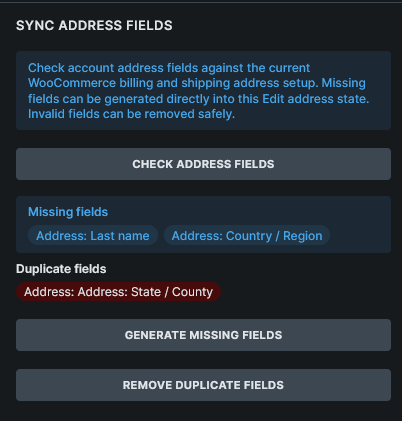
Section titled “Field maintenance”The Edit address state can audit and sync generated account address fields against the current WooCommerce account address field registry.
Use the field maintenance actions after plugins or WooCommerce settings change account address fields:
- Check address fields
- Generate missing fields
- Remove invalid fields
- Remove duplicate fields
Query loops and dynamic data
Section titled “Query loops and dynamic data”Account Page v2 supports WooCommerce v2 query loops for account orders, order actions, account downloads, and account addresses.
Use account and order tags such as {woo_account_address_title}, {woo_account_address}, {woo_order_number}, {woo_order_view_url}, {woo_order_download_name}, and {woo_order_action_url} in the matching state or query loop.
See WooCommerce v2 query loops and dynamic tags for the complete reference.
Usage tips
Section titled “Usage tips”- Use WooCommerce advanced modular elements or the Woo Setup Wizard to create the recommended Account Page v2 structure.
- Review each state after setup so logged-in, logged-out, password reset, payment method, and order views all match your store design.
- Use the classic WooCommerce Account Builder workflow if you prefer separate endpoint templates.
Was this helpful?
A quick vote and short notes help us improve these docs faster.
Leave a note for us
Please do not include passwords, license keys, or personal data. We store submitted notes to improve the docs.
Thanks for sharing feedback. We're using it to improve these docs.