
Pagination
The Pagination element displays page navigation for query results with customizable styling.
To paginate a listing and its map markers, select the results loop containing Map Connectors, enable AJAX, and select the same loop under the map’s Sync with query setting. See map queries and interactive listings.
Settings
Section titled “Settings”-
Query (query-list) - Select which query this pagination controls.
-
Enable AJAX (checkbox) - Refresh the target query without a full page reload. Enable this when using Pagination with Query Filters.
-
Alignment (justify-content) - Horizontal alignment of pagination links.
-
Height (number with units) - Height of pagination buttons.
-
Width (number with units) - Width of pagination buttons.
-
Spacing (number with units) - Gap between pagination buttons. Default: 20px.
-
Background (color) - Background color of pagination buttons.
-
Border (border) - Border styling for pagination buttons.
-
Typography (typography) - Font settings for pagination buttons.
Current
Section titled “Current”-
Background (color) - Background color of the current page button.
-
Border (border) - Border styling for the current page button.
-
Typography (typography) - Font settings for the current page button.
-
Previous Icon (icon) - Icon for the previous page button.
-
Next Icon (icon) - Icon for the next page button.
Miscellaneous
Section titled “Miscellaneous”-
End Size (number) - Number of page numbers shown at the start and end. Default: 1.
-
Mid Size (number) - Number of page numbers shown on each side of current page. Default: 2.
AJAX pagination and browser history
Section titled “AJAX pagination and browser history”In Bricks 2.5, Enable AJAX also lets a standalone Pagination element restore its query results and active page when visitors use the browser’s Back and Forward buttons. No Query Filter element is required. For example, after visiting pages 1, 2 and 3, Back returns both the URL and results to page 2.
This uses the existing AJAX setting; there is no separate history or scroll-restoration control. Bricks retains the browser’s native scroll restoration. Review any Pagination completed interactions that scroll the page, since they can also run during standalone history restoration. Developers can use the pagination history event after the asynchronous results have been restored.
Queries with Query Filter elements use the filter history workflow. The standalone history event does not signal completion of those filtered queries. Restoring accumulated Load more or Infinite scroll results is outside this Pagination workflow. If a standalone history request fails, Bricks loads the target URL to recover the matching results.
Multiple Pagination Elements
Section titled “Multiple Pagination Elements”Several Pagination elements can target the same query, such as navigation above and below a product listing. They stay on the same page while keeping their own icons and display settings.
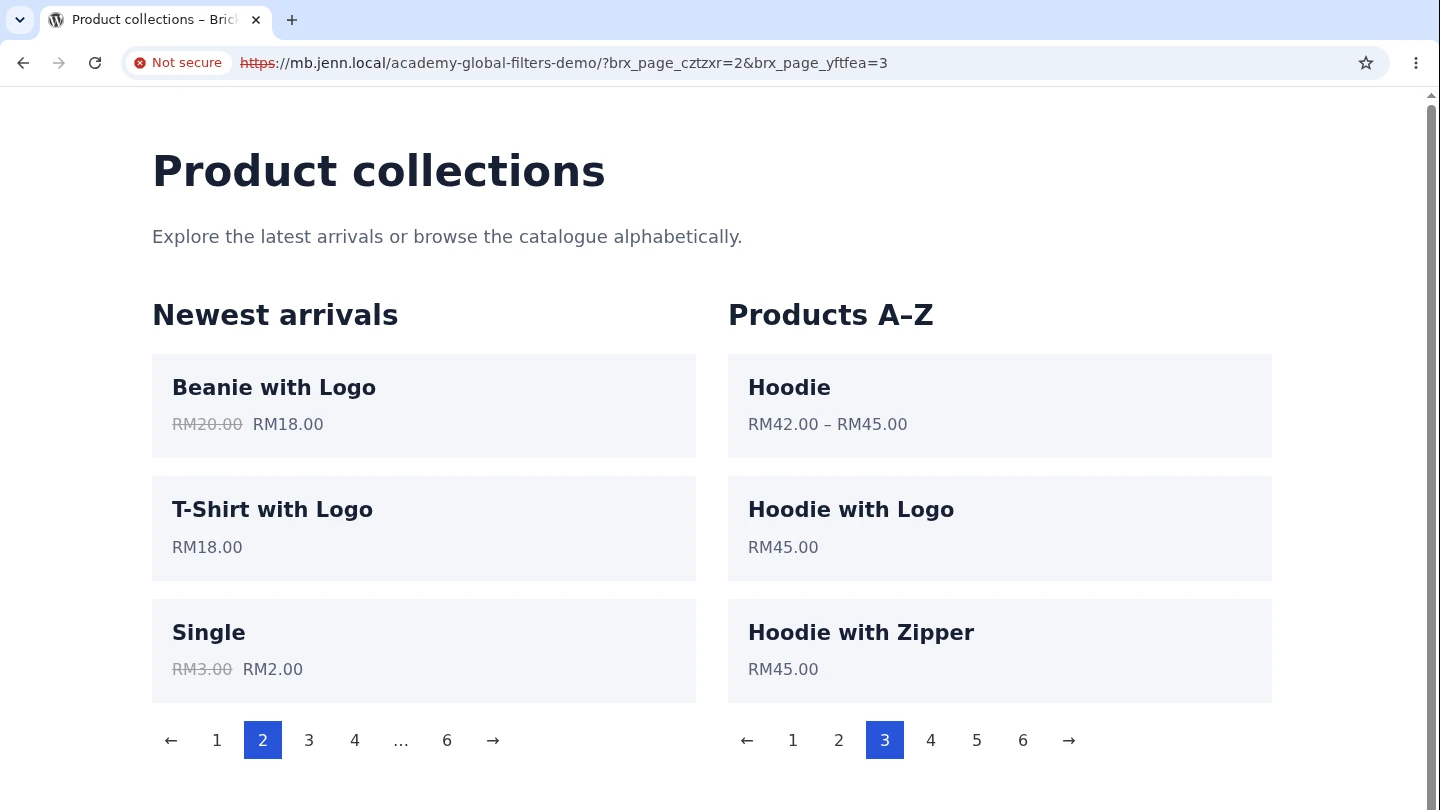
Starting with Bricks 2.5, Pagination elements targeting different queries on the same page keep independent page numbers. Bricks adds query-specific parameters for custom queries automatically:
?brx_page_querya=2&brx_page_queryb=3Here, querya and queryb represent the rendered target query IDs. Returning one listing to page one removes only its page parameter. Other queries retain their page and committed filter selections.
This URL format applies when Pagination elements target more than one distinct query on the page. Multiple loops alone do not activate it. Two Pagination elements targeting one query retain the existing URL format.
The main WordPress archive query keeps its normal /page/N/ or ?paged=N route. Secondary queries use their own parameters. Bricks chooses an unused suffixed parameter if a filter already uses the expected name. Custom pagination base/format hooks still apply.
Independent pagination works with or without Query Filters enabled. Test the links, reload, and browser back/forward when a page contains several listings.
Was this helpful?
A quick vote and short notes help us improve these docs faster.
Leave a note for us
Please do not include passwords, license keys, or personal data. We store submitted notes to improve the docs.
Thanks for sharing feedback. We're using it to improve these docs.