
Dynamic fragment
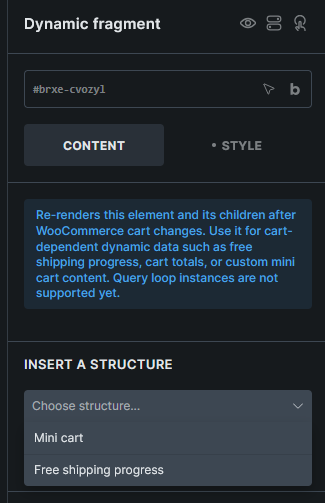
Re-renders WooCommerce cart-dependent content after cart changes.
Where this element works
Section titled “Where this element works”WooCommerce-aware Bricks layouts, such as page content, headers, and footers that need to update after cart changes.
Key settings
Section titled “Key settings”- Insert a structure (select) - Choose a generated starter structure.
- Generate (button) - Adds the selected structure to the element.
Generated structures
Section titled “Generated structures”- Mini cart
- Free shipping progress
Generated structures are appended to the current content and do not overwrite existing content.
Usage tips
Section titled “Usage tips”- Use Dynamic fragment for cart-dependent content outside the main Cart page, such as custom mini cart content, free shipping progress, or cart totals.
- Keep the fragment focused on content that needs to refresh after add-to-cart, remove-from-cart, or quantity changes.
- Keep the Dynamic fragment wrapper outside other query loops. A cart loop can be placed inside the fragment.
Custom mini cart pattern
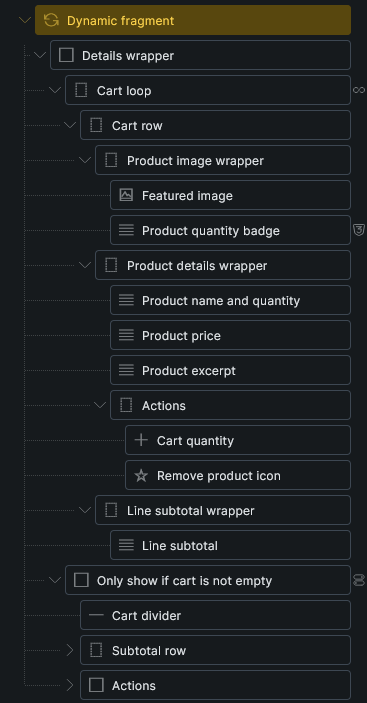
Section titled “Custom mini cart pattern”To build a lightweight custom mini cart:
- Add a Dynamic fragment element where the mini cart should render.
- Inside it, add a container and enable the Cart contents query loop.
- Design the cart item row inside the loop.
- Use cart item tags such as
{featured_image},{woo_cart_product_name},{woo_cart_quantity:value},{woo_cart_subtotal}, and{woo_cart_remove_link:url}. - Add cart total tags outside the loop but still inside the Dynamic fragment, such as
{woo_cart_items_count},{woo_cart_order_subtotal},{woo_cart_order_total},{woo_free_shipping_remaining}, and{woo_free_shipping_progress}.
See WooCommerce v2 query loops and dynamic tags for the complete tag list.
Refresh behavior
Section titled “Refresh behavior”Dynamic fragment refreshes after WooCommerce cart, coupon, and checkout events such as add to cart, remove from cart, cart emptied, cart totals updated, checkout updated, and coupon apply/remove events.
After a refresh, Bricks reruns frontend functions and dispatches:
document.body.addEventListener('bricks/woocommerce/fragments/refreshed', (event) => { console.log(event.detail.fragments)})This refresh event also covers initial synchronization and checkout recalculations that do not change cart items. For a custom success notice or popup, use the Bricks cart contents changed interaction trigger, available since Bricks 2.4. It runs after a confirmed AJAX addition, removal, or quantity change and the related UI updates finish.
Limitations
Section titled “Limitations”- Dynamic fragment is frontend-only.
- Do not place the Dynamic fragment wrapper inside a query loop.
- Component instances are not supported.
- The source area must be header, content, or footer.
Was this helpful?
A quick vote and short notes help us improve these docs faster.
Leave a note for us
Please do not include passwords, license keys, or personal data. We store submitted notes to improve the docs.
Thanks for sharing feedback. We're using it to improve these docs.