
Filter: bricks/element/settings
Bricks 1.5 adds the possibility to change the element settings before it is rendered.
This allows you to change a text element content programmatically, or add styles based on a custom conditional logic, like so:
add_filter( 'bricks/element/settings', function( $settings, $element ) {    // Add "[online]" text to all the headings elements if the visitor is logged in    if ( $element->name === 'heading' && is_user_logged_in() ) {        $settings['text'] .= ' [online]';    }
    return $settings;}, 10, 2 );
In case you need to programmatically add an element conditional display logic, check the filter bricks/element/render.
Example: Dynamically set WooCommerce Product Filter (Price) max price from all products
Section titled “Example: Dynamically set WooCommerce Product Filter (Price) max price from all products”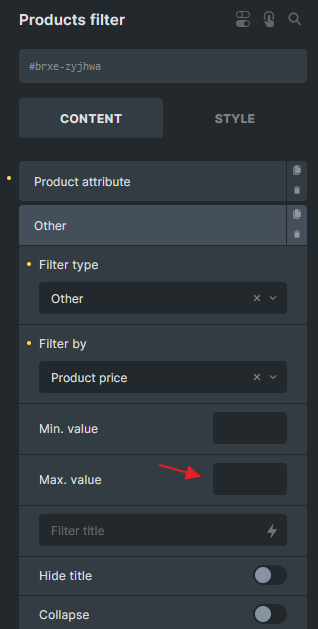
add_filter('bricks/element/settings', function( $settings, $element ) {  // Change the zyjhwa to your element ID  if( $element->id !== 'zyjhwa' || ! isset( $settings['filters'] ) ) {    return $settings;  }
  // Get all products  $products = wc_get_products(array(    'status' => 'publish',    'limit' => -1, // Retrieve all products  ));
  $highest_price = max(array_map(function ($product) {    return $product->get_price();  }, $products));
  foreach( $settings['filters'] as $key => $filter ) {    if( ! isset( $filter['otherFilter'] ) || $filter['otherFilter'] !== 'price' ) {      continue;    }
    $settings['filters'][$key]['sliderMax'] = $highest_price;  }
  return $settings;}, 10, 2);
Was this helpful?
A quick vote and short notes help us improve these docs faster.
Leave a note for us
Please do not include passwords, license keys, or personal data. We store submitted notes to improve the docs.
Thanks for sharing feedback. We're using it to improve these docs.