
Post content
The Post Content element is a placeholder in the builder that tells Bricks to fetch the post content into the layout you’re building.
Since Bricks 1.3.5 you can select the source from which to pull the content:
- WordPress Editor (Gutenberg/Classic editor)
- Bricks Data
The Data Source control is only visible when the Post Content element is used in Bricks templates.
If the Post Content element is placed in a Page/Post, etc. the WordPress content is fetched by default.
How to use the Post Content element
Section titled “How to use the Post Content element”Inside the builder, go to the Elements panel and look for the Post Content element in the Single elements group or use the element search bar in the panel header. Click or drag the Post Content element onto the canvas.

If the element is inserted when editing a post or page, it will automatically show the WordPress editor content on the canvas unless there is no Page/Post content. That content is also shown on the front end.
This is useful when creating a Single Post template in which you want to show the WordPress content (e.g. a single blog post).
Lightbox for Gutenberg images
Section titled “Lightbox for Gutenberg images”Since Bricks 2.5, the Lightbox setting opens media-linked Gutenberg images in the Bricks lightbox. It is off by default and available when the Post Content element uses WordPress as its data source.
- In the WordPress block editor, link the images in your Image or Gallery blocks to Media file.
- In Bricks, select the Post Content element. If you are editing a template, set Data source to WordPress.
- Enable Lightbox in the element’s Content tab, save, and check the images on the frontend.
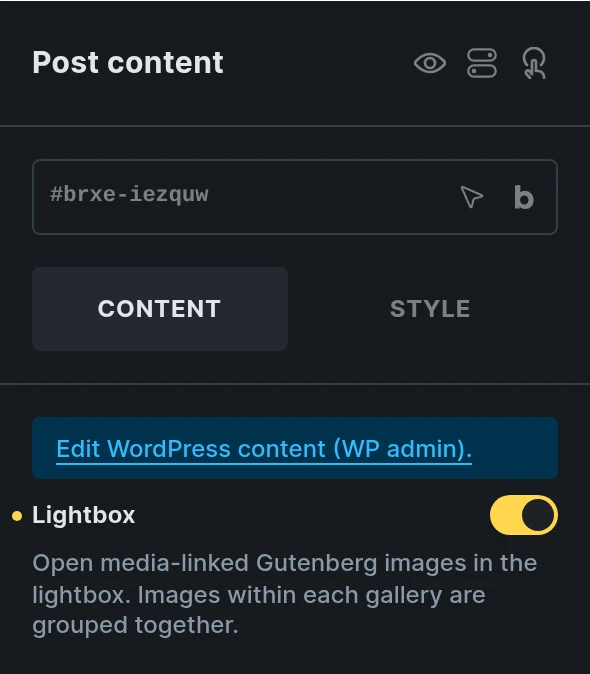
Images within each Gallery block are grouped together so visitors can navigate between them. Separate galleries stay in separate groups, and standalone Image blocks open individually.
The image must come from the WordPress Media Library and link to its full-size media file URL. Custom links, attachment-page links, and images without valid attachment dimensions keep their existing behavior. Unlinked images using WordPress’s native Expand on click lightbox are unaffected.
This setting changes the rendered output without rewriting your saved Gutenberg blocks. It does not apply when Data source is Bricks. For more on working with both editors, see Gutenberg integration.
Fetching Bricks Data with the Post Content element
Section titled “Fetching Bricks Data with the Post Content element”In certain scenarios, you’d like to edit each post with Bricks instead of using the WordPress editor such as when using more complex layouts that aren’t possible with WordPress.
In this case, you need to set the Data Source to “Bricks” in the Post Content settings:

Creating different page layouts using the Post Content
Section titled “Creating different page layouts using the Post Content”When using a Bricks template as your page layout this template is rendered on the frontend instead of the individual page created with Bricks.
If you use the Post Content element and set the Data Source to Bricks, you can design different page templates and still fetch each page content built with Bricks.
A common use case would be to build a page template with two areas: the main area (which is populated with the page content), and a fixed sidebar for all the pages.
To get the Bricks-built content of each page, the Data Source of the Post Content element needs to be set to “Bricks”:

Bricks Page Template using a Post Content element to fetch page bricks data
Settings
Section titled “Settings”- Data source (select) - Choose content source. Options: WordPress, Bricks. Default: WordPress. The select is only available for templates, since on pages it automatically uses WordPress as the source.
- Lightbox (checkbox) - Open media-linked Gutenberg images in the Bricks lightbox. Default: Off. Available for the WordPress data source. Each Gallery block forms its own group.
Was this helpful?
A quick vote and short notes help us improve these docs faster.
Leave a note for us
Please do not include passwords, license keys, or personal data. We store submitted notes to improve the docs.
Thanks for sharing feedback. We're using it to improve these docs.